Addiction....
from ShredderFeeder@shredderfood.net to selfhosted@lemmy.world on 30 Jun 20:48
https://shredderfood.net/post/17172
from ShredderFeeder@shredderfood.net to selfhosted@lemmy.world on 30 Jun 20:48
https://shredderfood.net/post/17172
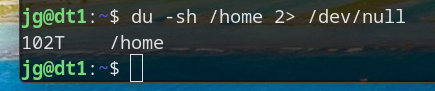
I think I officially have a hoarding problem…
#selfhosted
threaded - newest
Your username absolutely does not check out. Or your shredder is broken haha
For working I’m a backup and DR guy…the name was intended to be ironic. ;-)
I shred paper. ;-) After digitizing it of course. ;-)
I was like “nothing wrong here” until I saw that T that my brain just refused to parse the first time.
If I was on my laptop and not my phone I would post a screenshot with a P just for you
lol , is home separate mount point?
Yeah,
So Home is a separate 1.8TB NVME drive… But under home is my home directory, and under that is a half-dozen NAS mounts, including my
Plex stuff.collection of ISO images. ;-)omg. how many isos to get 100tb
If you’re doing raw bluray, not as many as you’d think.
Yeah, a single raw blu-ray can be over 100GB. I ripped my whole doctor who blu-ray collection once, it took quite a few days. And that wasn’t even 4k or HDR or anything. The first few seasons are even interlaced iirc.
BR is 25/50G, 4K BR is 66/100G
Uncompressed raw blu-ray rips most certainly are not.
Greetings, fellow data hoarder!
Pfft, the only “hoarding problem” is that storage is expensive these days!
I know, I just paid $500 for a 24TB SAS drive that was $250 just over a year ago.
That’s a good deal. Microcenter was selling a WD 20TB external HDD for $600. Didn’t end up pulling the trigger 'cause I’m going for a 2 drive Raid1 config on my janky setup and $1350 w/ taxes is way too steep.
SAS actually ends up being a little cheaper due to it not being as compatible with home systems… And it’s a refurb but I got lucky because smartctl showed it only had about 200 hrs of uptime reported.
Rookie numbers.
Try that shit on datahoarders and see hoards measured in Petabytes
Jesus…
I went there once, on Reddit, and they are indeed over PB for some years now.
I myself already have 50T and it feels like a bottomless pit
I’m at single digit TBs and dreading that a drive breaks and I need a new one. Not that I have a lot of free space either.
Well, a 256GB of storage in flash drive form can be obtained for $31 or less. So it is very possible to slowly save a copy of your data from the most important to the least. (Or to move 256GB of your least important data off at a time). The data curation community is a great resource for figuring out how to organize things to keep found things found
Pardon my stupidity BUT why include stdout to Devnull? Why not omit and simply ‘du -sh /home’
That’s stderr, not stdout
There’s probably a bunch of permissions errors, filesystems warnings for cross-filesystem mounts or links, etc. all going to stderr. Linux output streams are a bit odd, 1 is stdout and 2 is stderr. So the command is redirecting the “noise” to null and just printing the actual command output. That would be my assessment, but OP could probably give a more correct answer…!
Noob, just use sudo, less chars!
Oddly enough, still generates errors. (There are stuff in user directories that are set to 600… so even root can’t browse/open.)
Well now I have to try this. Missing that executable bit would make sense. But last time I did this on / I didn’t get errors 🤔
There’s also some stuff in Proc and run that won’t let you.
Are you sure? Root can see everything.
On a network, it can’t.
NFS mount probably.
Nope, you are exactly on.
2> means stderr… Keeps the “can’t access …” Out of the display.
Bruh
To be fair, all but about 2TB of that is on a NAS…but still.
Bob Saget would roll in his grave if he heard about your addiction.
“You ever suck some dick for some HDDs?”
Lately, I’m considering it.
That’s an option?
I’m reading the command to the tune of Du Hast
Du hast mich. Du hast mich gefragt UND ICH HAB SPEICHERPLATZ
Toller Musik Geschmack!
Meanwhile here I am trying to upgrade my 512gb NVME drive to 2Tb while also still trying to afford car payments, rent and food. Rookie numbers on my part.
The most well-timed thing I ever did was buy 6 2tb NVMe drives in August last year
God help me if one fails
Acronyms, initialisms, abbreviations, contractions, and other phrases which expand to something larger, that I’ve seen in this thread:
4 acronyms in this thread; the most compressed thread commented on today has 7 acronyms.
[Thread #35 for this comm, first seen 1st Jul 2026, 05:50] [FAQ] [Full list] [Contact] [Source code]
never saw the s argument and was curious what’s the difference to d. man pages are way ahead of me ^^
Now I need to try that.
So just did a couple of experiments…
sudo su -sh /home - returns permission denied errors on certain NAS subdirectories, but not a lot.
du -sh /home --summarize -returns the same errors.
du -sh --max-depth=0 - returns the same errors plus an error saying that using --max-depth=0 is the same as --summarize.
;-) for the purposes of what I was doing (creating a clip for posting) redirecting stderr to null was the best option.
But I learned a few things today, which is cool. ;-)
that is always the most important. thanks for sharing!
I create videos, and back up all of my raw footage. I make weekly videos, and the size ranges from 50GB up to 500GB or more. I have 105TB available, 90TB used at the moment. I also have a fully redundant set of another 105TB. My employer has unfortunately made it very easy to justify hoarding, as they’ll sell me reputable used commercial drives for $10/TB.
The video archives are 53TB
TubeArchivist is 19TB
Legally acquired movies and TV is 10TB
Immich is 2TB
Those are the main users of data. A bunch of other folders are using anywhere from a gig to 500GB, but those are basically rounding errors.
One think I miss from reddit… /r/datahoarder
These were my people. I probably have 100TB but it certainly isn’t in my home directory. I’m not sure if I should be immpressed or freightened.
There’s !datahoarder@lemmy.world, !datahoarder@lemmy.ml, and !datahaorder@selfhosted.forum…