Radicale: Can someone please offer any guidance on usage and security. Om abit lost
from philanthropicoctopus@thelemmy.club to selfhosted@lemmy.world on 11 Jun 22:02
https://thelemmy.club/post/50870707
from philanthropicoctopus@thelemmy.club to selfhosted@lemmy.world on 11 Jun 22:02
https://thelemmy.club/post/50870707
Hi everyone
I posted before here. I’ll try once more but don’t want to get over bearing.
I’m trying to self host all my contacts and my calendar.
I’ve managed to install radicale but there very little ui and I’m not actually sure how to import my contacts and calendar, or how to start using it with a client.
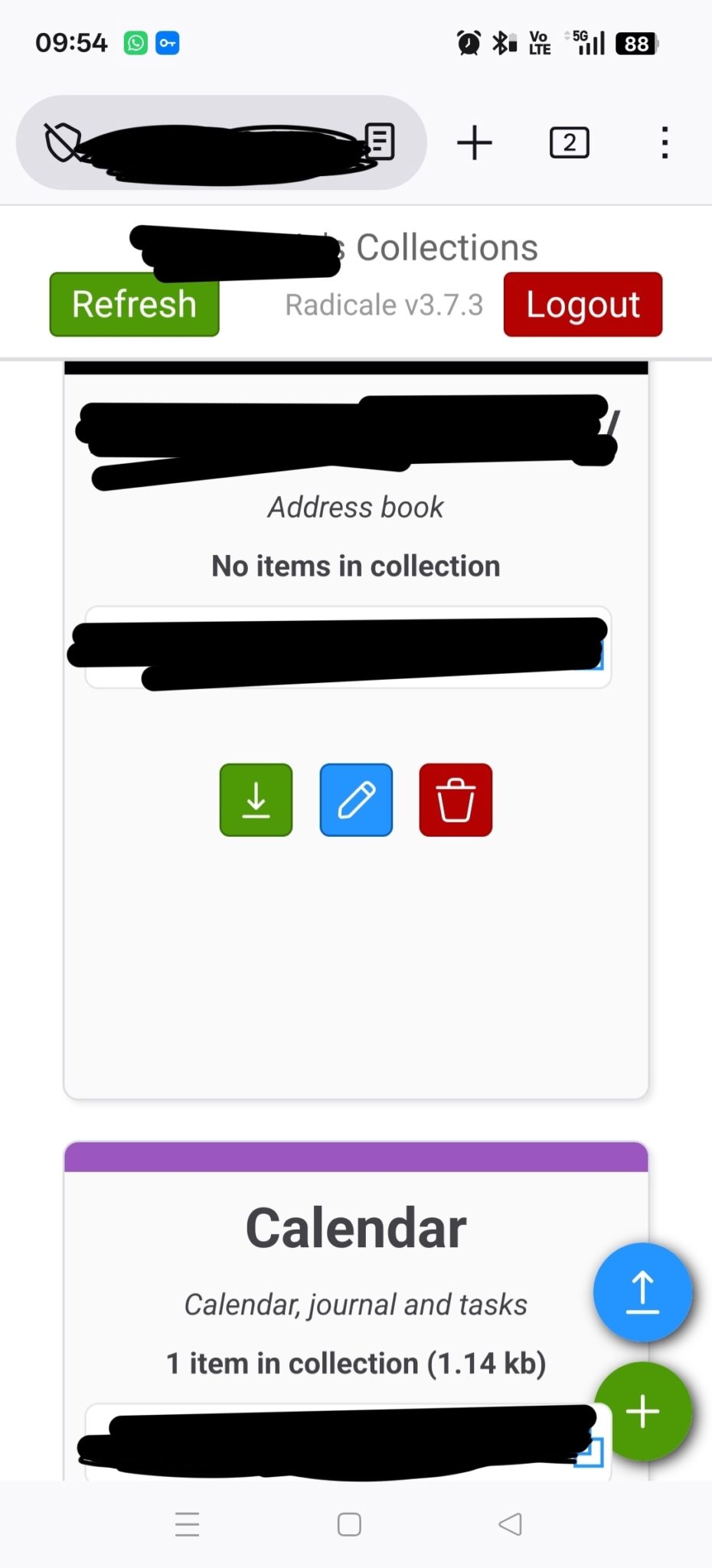
This is all I see
I’ve set up the calendar and contacts server but I can’t find any security settings to password protect it
Any guidance would be awesome, thank you
#selfhosted
threaded - newest
There are many different clients available
What is the use case?
Hi! I use radicale!
I use it on android. For me, I have to use an app called “DAVx5.” That app adds the calendar/contacts from my caldav server (radicale) to my phone. Then in my calendar/contacts apps I checkbox the appropriate calendar/contact list. It looks like you’re on android… does this info help?
Radicale doesn’t really have a GUI, all it has is a webpage that you can log in to. On that page you can download or upload your calendar/contacts in one file, but that’s about it. The handling of everything is done by external apps.
Thank you. I’ve got it going, I’m just not sure how to select it on my phone. I’ve got it running on dav5x
I use fossify calendar and fossify contacts. They both have options to use the contacts/calendar through davx5.
Nice, good to hear! Radicale is really nice and simple to setup too. If you want a good desktop calendar app, I know that both GNOME Calendar and Thunderbird work well with Radicale (I currently use the latter).
Radicals is an amazing software but I also struggled to understand the concept at first, the documentation assumes you know so much already, which you normally don’t. But once you get through the initial hurdle it’s really reliable and uses minimal resources.
FYI, you can just edit your post, you don’t need to delete and post again
Unfortunately I don’t use radicale so I can’t help much on that front
The options to password protect it are in the (usually
/etc/radicale/)configfile under[auth].For proper security you could use
type = htpasswdhtpasswd_filename = /etc/radicale/usershtpasswd_encryption = bcryptthen create a users file with apache tools (
htpasswd -c -B users User1) or one of the million online htpasswd file creators.Don’t generate password files online,…
… because? … or, instead, do…?
Because if I wanted to harvest a bunch of passwords I would offer a online password generator.
Do use apache utils locally.
While you are right in general, you are just creating a file with a <user>:<hashed password> line without any identifying context. So have fun searching the world for where I might have actually used it. Sounds like a really bad use of ressources to create list of passwords.
PS: Yes, as an Arch user I am still pissed that this tool is not available in the repos beside installing the complete Apache server…
The password is also hashed…
Your browser also sends all kinds of fingerprintable information.
Please note that to use “bcrypt” for
htpasswd_encryptionyou need the bcrypt python module installed. Some distributions of radicale (eg. some docker images) don’t have it.It’s fairly safe to set it to “md5” instead. It does not mean plain MD5 (one iteration), it does several hundred rounds of MD5 plus a salt.
For the curious, the advantage of bcrypt over a single-iteration, fast hash like MD5 is that bcrypt lets you set the hashing effort, while MD5’s goal is to do it as fast as possible.
This becomes relevant when someone steals your password file and tries to brute force it by hashing a bunch of dictionary words and random strings (plus a bunch of salts) until something matches. A fast single-iteration hash like MD5 will let them do that much faster than a bcrypt hash set to a higher effort; it can mean the difference between finding a password in one week vs finding one in 100 years. That’s what the hundreds-of-iterations MD5 is trying to achieve, it’s a “poor man’s bcrypt”.
Yes, radicale works great, but the UI is pretty spartan. It will manage the data, but requires a client to make edits or view the content.
First, you will have to export any existing calendar and contacts as files. It depends on what you’re currently using. Contacts should probably be a vcf file, and a calendar should probably be an ics.
Next, use the ↑ button in radicale, select the exported files, and it will create a new “collection” as shown in your post. You can also create a new empty collection to use as you wish. Radicale will not merge files, but you can use a client to do that once you have created the collection in radicale.
You will have to find a client that will sync. On Android, DAVx5 will integrate it into the system so basically any client can access it. Certain Android apps may connect directly, but it’s pretty hit or miss. On desktop, I use Thunderbird which works very well, but there are other options. You will use the blacked-out URL in your post to add the contacts and calendar. Check the individual app documentation or make another post if you want help.
Oh, and the last thing… Of course the client will have to be on the same network. If you want to access it remotely, you will want to set up something like wireguard (I use Tailscale, which is dead simple).
Good answer. i would add, since most people already have their contacts set up in their phone, that after setting up davx5, they have a new empty phone book. Most phones already have s mechanism to move your contacts to a new phone book. Just move them over and delete or disable the phone book you currently use like google etc.
Do you know how to disable the stock contacts? Do I do this using adb? I’ve done that before for other apps
Usually in the account settings for your google account.
Thank you so so much. I was able to upload my calendar and contacts. I really appreciate your detailed response. It helped me out heaps
DAVx5 also includes good security, like the ability to use mTLS to secure your access to Radicale adequately even if you expose it over the open Internet. It’s also being actively developed, with updates coming out every few weeks.
You forget about that UI. Only used to create users. Then use. Cardiac/cal app like Dav5X on Android or similar to connect and do all the stuff like create, import etc
See my wiki at wiki.gardiol.org/7-services/radicale
It also shows how to install infCloud to get an actual web GUI to use calendars from your server
Nice wiki
Didn’t know about infCloud… thanks
Yes, there aren’t many options that is not idea but it works fine
Infcloud is the only presentble web ui for webdav/cldav/carddav, but as far as I remember its unmaintained
InfCloud is the last and only functional, standalone, web-based CalDAV frontend currently in existence. It doesn’t really matter how crap it is because there’s no alternative. And besides CalDAV/CardDAV are not exactly rapidly-evolving anymore.
There are a handful of alternative frontends bundled with other webapps, for example Nextcloud includes one, but if you don’t want to install Nextcloud just for that you’re stuck with InfCloud.
I really wish someone would make a modern standalone webapp for this but no luck so far.
Having worked at some point on some calendar interfaces I can appreciate why, because they’re super intricate and difficult.
I’ve been thinking of creating one for a long time but it’s sitting in my pile of project ideas.
Honestly, if some other experience software engineer is up for it, we’ll do it together.
Thank you
I’ve downloaded dav5x. How can I make sure om using the server contacts and not still on Google contacts?
I’ll read that, thank you for sharing
Start by using a 3rd party contacts app (or dialer+contacts as they usually come, at least on Android). Google’s Contacts app only works with Google.
The 3rd party app should let you explicitly select which sources of contacts you want to use. After you set up DAVx5 you should see it available as a source.
The app I use (True Phone, com.hb.dialer.free) shows a list of all sources under “Settings > Contacts > Contacts to show” and you can check/uncheck the ones you want.
I think I tried using AgenDAV - CalDAV web client at one point but I either ran into a speedbump or I decided I didn’t need it. Is that the same? I also found this vibe-coded thing while searching just now.